


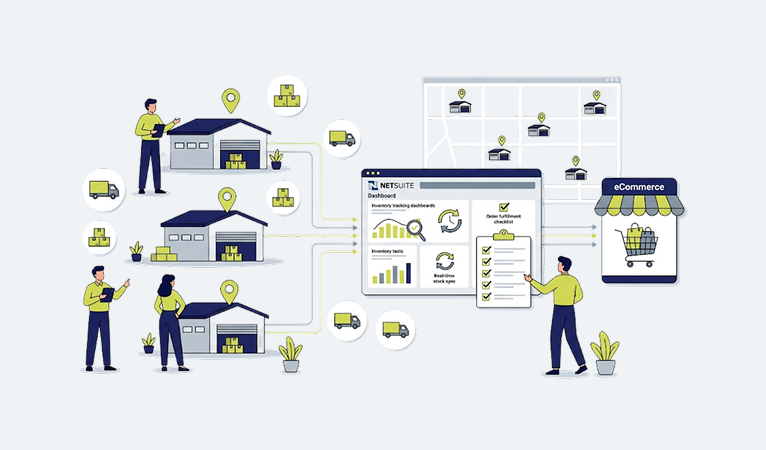


Why Multi-Warehouse Inventory Gets Hard as Distributors Grow
I’ve sat in enough warehouse offices to know the moment it happens. A distributor opens a second location maybe to get closer to a big account, maybe because a competitor’s building came up for lease and it was too good to pass on and for about six months, everything is fine. Then a customer calls asking where their order is, and nobody can tell them, because the item shows “in stock” in the system but it’s actually sitting on a shelf 400 miles away.
That’s the moment multi-location inventory stops being a nice problem to have and starts being a real operational risk.
Here’s the pattern I’ve watched play out at electrical distributors, HVAC suppliers, JanSan companies, plumbing wholesalers, and foodservice suppliers across the country for three decades: single-warehouse inventory management is forgiving. You can run it on instinct. The warehouse manager knows what’s on the shelf because he walked past it an hour ago. One inventory count, one set of bin locations, one truck schedule. Add a second warehouse and every one of those assumptions breaks at once.
Now you’ve got the same SKU sitting in two places with two different quantities, two different reorder points, and if nobody’s paying attention two different costs, because your Denver location bought from a different vendor at a different price than your Phoenix location. Your sales reps start quoting availability from memory instead of from the system, because the system is slower to trust than their own recollection. Customer service reps promise ship dates they can’t back up. And the warehouse teams start hoarding stock, because if they don’t protect “their” inventory, someone at the other location will get first crack at it.
None of this is a people problem. It’s a systems problem. The people are doing exactly what you’d expect smart, busy operators to do when the tools don’t give them a straight answer.
What changes at scale:
- One location means one truth. Multiple locations mean multiple truths unless something forces them to reconcile in real time.
- Sales reps quoting from memory works at one warehouse. It becomes a liability at three.
- Purchasing decisions made in isolation at each branch lead to duplicate buying, overstock at one site, and stockouts at another often for the exact same part number.
- Customer-facing promises (ship dates, “in stock” badges on your B2B site) become guesses instead of facts.
I tell clients this all the time: growth doesn’t cause inventory chaos. Growth exposes inventory processes that were already fragile they just hadn’t been tested yet.
The Mistakes I See Distributors Make Over and Over
After enough implementations, you start to see the same five or six mistakes on repeat, regardless of industry.
Mistake #1: Treating each warehouse as its own silo. Separate spreadsheets, separate reorder logic, separate “who do I call to check stock” relationships. It works until a customer orders something that spans two locations, and then nobody owns the fulfillment decision.
Mistake #2: No single system of record. I’ve walked into distributors running their ERP for financials and a completely disconnected spreadsheet or legacy WMS for actual stock counts. The ERP says one thing. The floor says another. Whoever’s on the phone with the customer has to guess which one to trust.
Mistake #3: Confusing “on hand” with “available to sell.” This is the one that gets distributors in real trouble. On-hand quantity includes stock that’s already been allocated to an open order, reserved for a specific customer contract, or sitting in a quarantine bin waiting on quality inspection. If your eCommerce site or your reps are quoting on-hand instead of available-to-promise, you’re overselling and you won’t find out until the picker can’t find the part.
Mistake #4: No warehouse-level reorder logic. A lot of distributors set reorder points at the item level company-wide, not by location. That means Warehouse A can be sitting on six months of a slow mover while Warehouse B is chronically out of the same part.
Mistake 5: Manual inventory updates to the website. Somebody exports a spreadsheet nightly, or worse, weekly, and uploads it to the eCommerce platform. Customers are ordering against numbers that were accurate yesterday morning.
Mistake #6: No accountability for transfer accuracy. Warehouse transfers happen constantly in a multi-location operation, and if the system doesn’t force a clean in-transit status, inventory just… disappears for a few days. It’s not lost. It’s on a truck. But the system doesn’t know that, so nobody else does either.
What most ERP consultants won’t tell you: the software rarely causes these problems. Bad configuration does. I’ve seen NetSuite instances that were technically “live” for years still running on default settings that never accounted for how the client actually operates across locations. The tool was capable. Nobody had gone back and tuned it.
Why Spreadsheets Fail Past One Warehouse
I’m not anti-spreadsheet. Excel is a phenomenal tool for a hundred things a distributor does every day. Inventory across multiple locations is not one of them, and here’s the honest reason why: a spreadsheet has no concept of “right now.”
The second you export inventory data into a spreadsheet, it starts going stale. Somebody sells a part, ships a transfer, or receives a PO five minutes after the export, and the spreadsheet doesn’t know it happened. Multiply that by two, three, five locations, each with people working off their own copy, and you don’t have an inventory system you have five slightly different opinions about what’s true.
I worked with a plumbing distributor in the Midwest a few years back that ran a “master” inventory spreadsheet emailed out every morning at 7 a.m. It was a genuinely well-built spreadsheet pivot tables, conditional formatting, the works. But by 9 a.m., it was already wrong at two of their four branches. Sales reps were calling warehouse managers directly just to double-check before quoting big orders, which defeats the entire purpose of having a shared system in the first place.
Spreadsheets also can’t enforce a workflow. They can’t reserve stock the moment an order is placed. They can’t flag that Warehouse A is out but Warehouse C has 40 units. They can’t talk to your website. Every one of those gaps has to be filled by a person remembering to check, and people no matter how sharp will eventually miss something during a busy Monday morning rush.
This is the honest pitch for moving to a proper multi-location inventory system inside an ERP: it’s not about looking modern. It’s about removing the lag between “something happened in the warehouse” and “the rest of the company knows about it.”
4. How NetSuite Actually Manages Inventory Across Locations
NetSuite handles multi-location inventory through what it calls locations and, for larger operations, bins within those locations. Every item record can carry location-specific data: quantity on hand, quantity committed, quantity available, reorder point, preferred stock level, and lead time all tracked independently per warehouse, not blended into one company-wide number.
That distinction matters more than it sounds. When a rep pulls up an item in NetSuite, they’re not looking at “total inventory of Part #4471.” They’re looking at 212 units in Dallas, 340 in Charlotte, and 0 in Sacramento, with each number reflecting real-time commitments against open sales orders.
A few of the mechanics worth understanding:
- Location-specific reorder points let each warehouse manage its own replenishment logic based on its own demand pattern, not a blended company average.
- Bin management (for operations that need it) tracks inventory down to the shelf or rack level, which matters a lot once you’re running pick-pack-ship at any real volume.
- Committed vs. available quantity is calculated automatically the moment an order is entered NetSuite subtracts committed stock from on-hand to show what’s genuinely available to sell, per location.
- Multi-location item fulfillment lets a single sales order be fulfilled from more than one warehouse when needed, with each fulfillment tracked back to the originating location for cost and inventory accuracy.
- In-transit inventory tracking for warehouse transfers keeps stock visible (as “in transit,” not vanished) between the moment it leaves one location and arrives at another.
What NetSuite doesn’t do out of the box, and this is the part that trips people up, is make any of this visible or usable to your customers in real time. NetSuite is the system of record. It’s not, by itself, a storefront. That’s where a lot of distributors hit a wall: their ERP is accurate, but their website is still running on a nightly export because nobody built a proper live connection between the two.
That gap ERP accuracy vs. website accuracy is the single biggest reason multi-warehouse distributors end up looking for a commerce platform that was actually built to sit on top of NetSuite, instead of a generic eCommerce platform with a NetSuite plugin bolted on.
Real-Time Inventory Visibility: What It Actually Requires
“Real-time” gets thrown around loosely in this industry, so let me be specific about what it actually means operationally, because there’s a real difference between “updated periodically” and “updated the instant something changes.”
Real-time inventory visibility means that the moment a unit is picked, received, transferred, or adjusted anywhere in your warehouse network, that change is reflected everywhere someone might look for it the ERP, the customer-facing website, the sales rep’s order screen, and any connected marketplace without a batch job, a nightly sync, or a manual export standing in the way.
Three things have to be true for that to actually work:
- A single source of truth. Every location’s inventory activity has to flow through the same system. If a warehouse is running a side process a local spreadsheet, a standalone scanner app that doesn’t push back to the ERP you’ve broken real-time visibility no matter how good your other systems are.
- An event-driven connection to your storefront, not a scheduled one. A lot of “integrations” I’ve reviewed over the years are really just scheduled data dumps every 15, 30, or 60 minutes. That’s not real-time it’s just faster batch processing, and it still leaves a window where your website is wrong. A properly built connection pushes inventory changes to the storefront as they happen.
- Availability logic that accounts for commitments, not just raw counts. Real-time visibility that shows on-hand quantity without netting out what’s already been sold or reserved isn’t actually useful it’s just fast bad data.
This is one of the areas where the choice of eCommerce platform matters as much as the ERP itself. Axim Commerce, for example, was built specifically as an ERP-first B2B platform for NetSuite users, which means inventory checks happen live against NetSuite rather than against a cached copy that’s refreshed on a schedule. For a distributor running four or five warehouses with fast-moving SKUs, that architectural difference is the line between a website customers trust and one they call to double-check.
Inventory Allocation Across Warehouses
Allocation is the process of deciding which warehouse’s stock actually gets committed to a given order and it’s one of those things that seems simple until you’re running multiple locations with overlapping customer bases.
The naive approach is “ship from whichever location has stock.” That works until you have two locations with stock and no logic for choosing between them, and now you’re relying on whoever happens to process the order that day to make a judgment call. One rep ships from the nearest warehouse. Another ships from whichever location has the most stock, to “balance things out.” A third just ships from wherever they always ship from, out of habit. None of those are wrong exactly, but none of them are consistent, and inconsistency is what creates freight cost overruns and customer complaints about slow delivery.
A working allocation strategy usually considers, in some priority order:
- Proximity to the ship-to address (freight cost and transit time)
- Which location has enough stock to fill the full order without splitting it
- Whether the customer has a designated home warehouse or account assignment
- Current warehouse workload/capacity, for operations sophisticated enough to factor that in
- Cost basis, when items are valued differently by location
NetSuite can be configured to apply allocation rules automatically rather than leaving it to individual judgment call which matters enormously once order volume climbs past what a person can reasonably track in their head. The mistake I see most often is distributors who configure this once during implementation and never revisit it as their warehouse footprint changes. If you open a fourth location and don’t update your allocation logic, orders keep routing the way they did with three warehouses, and the new location sits underutilized while the old ones get overworked.
Safety Stock, By Location, Not By Gut Feel
Safety stock is the buffer between “we ran a little tight” and “we told a customer no.” Every distributor has some version of it, even if it’s never been formally defined it’s usually just whatever level the warehouse manager feels nervous going below.
The problem with gut-feel safety stock in a multi-location operation is that it’s not consistent, it’s not documented, and it doesn’t account for the fact that different warehouses serve different demand patterns. A distribution center serving a metro area with high order frequency needs a different safety stock calculation than a satellite warehouse serving a rural territory with lumpy, unpredictable order timing.
A reasonable starting formula for safety stock, per SKU, per location:
Safety Stock = (Maximum Daily Usage × Maximum Lead Time) − (Average Daily Usage × Average Lead Time)
It’s not perfect, and for genuinely critical or highly variable items, most operations layer in a service-level target (say, 95% or 98% fill rate) using demand variability, not just averages. But even that basic formula, applied consistently and by location, beats gut feel every time, because it removes the guesswork and gives your purchasing team a documented number to defend.
What I tell clients about safety stock in NetSuite specifically: it’s a location-level field on the item record, and it directly feeds your reorder point calculations. If you set it once at implementation and never touch it again, it decays in usefulness every quarter, because your demand patterns are not static seasonality shifts, new customers change your mix, and product lifecycles move fast items into slow-mover territory (and vice versa) more often than people expect.
Warehouse Transfers That Don’t Wreck Your Books
Every multi-location distributor moves inventory between warehouses. The question is whether that movement is tracked cleanly or whether it creates a black hole in your inventory accuracy for the two or three days the truck is on the road.
Here’s the failure mode I’ve seen more times than I can count: Warehouse A ships a transfer to Warehouse B. The moment it leaves the dock, Warehouse A’s system shows it as gone. But Warehouse B doesn’t receive it into their system until the truck actually arrives and someone scans it in. For those two or three days, that inventory doesn’t officially exist anywhere not on the shipping warehouse’s books, not on the receiving warehouse’s books, and definitely not visible to a customer service rep trying to answer “do you have this in stock?”
NetSuite handles this correctly if it’s configured correctly, using an in-transit status for transfer orders. The stock is deducted from the sending location’s available quantity but tracked as in-transit rather than simply vanishing, and it becomes available at the receiving location only once it’s actually received. That’s the right behavior but I’ve audited plenty of NetSuite instances where transfers were being processed as simple adjustments instead of proper transfer orders, which throws away that in-transit visibility entirely.
A few operational habits that make transfers cleaner:
- Require a transfer order (not a manual adjustment) for every inter-location movement, no exceptions, even for “just a couple units.”
- Set expected transit times by lane (Dallas to Charlotte isn’t the same as Dallas to a location three hours away) so in-transit inventory has a realistic expected arrival window.
- Reconcile transfer discrepancies weekly, not quarterly. Small transfer shrinkage compounds fast across a busy warehouse network.
- Don’t let warehouse managers “informally” trade stock outside the system, even between friendly branches. It always seems harmless until it isn’t.
Backorders, Drop Shipping, and Cross-Docking
These three fulfillment paths get lumped together sometimes, but they solve different problems, and a multi-warehouse operation needs clean logic for all three.
Backorders. When demand exceeds available stock across every location, you’re backordering the question is how gracefully your system handles it. Done well, a backorder automatically flags the shortfall, communicates a realistic ship date to the customer based on incoming POs or transfers, and fulfills partial quantities where the customer allows it rather than holding the entire order hostage for one missing line item. Done poorly, backorders sit invisible until a customer calls asking why their order hasn’t shipped.
Drop shipping. For distributors who don’t stock every SKU common in electrical, plumbing, and building materials, where certain items are only economical to source direct from the manufacturer drop ship orders need to flow to the vendor automatically, with tracking information flowing back into the order so the customer isn’t left in the dark. The mistake I see is treating drop ship as a manual, email-based process that lives outside the ERP, which means nobody has visibility into it once it leaves your system.
Cross-docking. This is receiving inventory specifically to route it straight back out to fulfill open orders, without it ever going into standard putaway. It’s efficient, but it requires tight coordination between purchasing and fulfillment the receiving team needs to know, at the moment of receipt, that a chunk of an inbound PO is already spoken for. Distributors running high volumes of made-to-order or project-based business (a lot of HVAC and building material suppliers fall into this category) lean on cross-docking constantly, and it’s one of the areas where a disconnected system causes the most friction, because purchasing and warehouse operations have to be talking off the same data in real time.
Order Routing: Getting the Right Warehouse to Ship
Order routing is allocation’s operational cousin once you’ve decided which warehouse should fulfill an order, routing is the mechanism that actually gets it there and keeps everyone informed along the way.
Good order routing logic in a NetSuite-connected environment considers the same factors as allocation (proximity, stock availability, cost) but also has to handle split shipments gracefully. If a customer orders 12 line items and no single warehouse has all 12 in stock, the system needs to decide: split the order across two locations and ship two boxes, or hold the whole order until one location can fill it complete? That’s a business policy decision, not just a technical one, and I always push clients to define it explicitly rather than letting it default to whatever the software happens to do out of the box.
For B2B distributors specifically, order routing also has to respect customer-specific rules. A national account with a contract specifying “ship complete only” needs different handling than a walk-in trade customer who’s fine getting partial shipments as stock becomes available. This is where a generic eCommerce platform tends to fall short those rules live in the ERP, and if your storefront can’t read and respect them at the point of checkout, you end up with orders routing incorrectly and someone on your team manually fixing it after the fact.
Inventory Forecasting for Distributors
Forecasting in distribution isn’t glamorous, but it’s the thing that determines whether you’re financing a warehouse full of dead stock or scrambling every month to cover demand you should have seen coming.
NetSuite’s demand planning tools can forecast at the item-location level using historical sales data, seasonality, and lead times which matters because forecasting company-wide and then dividing evenly across locations almost never reflects reality. A distributor with a coastal warehouse and an inland warehouse is going to see different seasonal patterns even for identical SKUs, driven by different customer mixes and regional demand.
What actually moves the needle on forecasting accuracy, in my experience:
- Segmenting SKUs by velocity (fast, medium, slow, and dead) and applying different forecasting rigor to each you don’t need a sophisticated model for a part that sells four units a year.
- Feeding forecasts with clean historical data, which sounds obvious but is where most forecasting efforts quietly fail garbage sales history in, garbage forecast out.
- Reviewing and adjusting forecasts on a real cadence (monthly, for most distributors) instead of setting it once and letting it run.
- Involving your sales team. They know about the big project coming in Q3 that a purely statistical model won’t see coming from historical data alone.
I’ve watched distributors over-invest in forecasting sophistication for their C and D moving items the ones that barely matter while under-investing in forecasting for the 20% of SKUs that drive 80% of revenue. Get the fast movers right first. The long tail matters less than people think.
Cycle Counting That Actually Sticks
Annual physical inventory counts are miserable, disruptive, and for a distributor running multiple warehouses nearly impossible to execute cleanly across every location simultaneously without shutting down operations for a day or more.
Cycle counting solves this by counting a rotating subset of inventory continuously, so your entire count cycle happens gradually throughout the year instead of all at once. NetSuite supports cycle count planning by location, and the smart way to structure it is by ABC classification: count your A items (high value or high velocity) most frequently, your B items on a moderate schedule, and your C items least often.
A cycle counting cadence that works for most mid-size distributors:
Classification | Typical Criteria | Count Frequency |
A items | Top 20% by value or velocity | Monthly |
B items | Next 30% | Quarterly |
C items | Remaining 50% | Semi-annually |
The habit that actually makes this stick isn’t the schedule it’s investigating discrepancies immediately instead of just correcting the number and moving on. A count variance is a symptom. If you don’t ask why the system said 40 and the shelf had 34, you’ll keep bleeding accuracy in the same spot every cycle.
Warehouse Performance Reporting
You can’t manage what you’re not measuring, and this is doubly true across multiple locations, where performance can vary wildly from one warehouse to the next without anyone noticing until it shows up in customer complaints or freight costs.
NetSuite’s saved searches and dashboards can be configured to report on warehouse-specific metrics fill rate by location, on-time shipment rate, pick accuracy, inventory turns, and carrying cost but the reports are only as good as the underlying data discipline. If one warehouse is sloppy about scanning transactions in real time, their reporting will look artificially clean (or artificially bad) compared to a location that’s diligent about it.
The distributors who get real value from warehouse reporting treat it as a weekly operating rhythm, not a monthly or quarterly review. A problem caught in week one is a quick conversation. The same problem caught in month three is a pattern that’s already cost real money.
Customer-Specific Inventory Availability
This is one of the more nuanced pieces of multi-warehouse inventory management, and it’s where a lot of generic eCommerce platforms fall flat, because it requires the storefront to understand things that live deep in the ERP: customer contracts, account hierarchies, and negotiated terms.
Some examples of what “customer-specific” availability actually means in practice:
- A national account with a supply agreement might have inventory reserved specifically for them at a given location, invisible to other customers browsing the same SKU.
- A customer assigned to a specific “home” warehouse (common in territory-based distribution models) might see availability and pricing reflect that location by default, even if other warehouses technically have stock.
- Certain items might only be available to specific customer tiers or account types a contractor account seeing trade pricing and full catalog access, while a general account sees a restricted subset.
This is exactly the kind of complexity that a NetSuite-native, ERP-first commerce platform is built to handle, because the logic lives where the data lives in NetSuite rather than being recreated and maintained separately in a bolted-on eCommerce layer. Axim Commerce’s approach to account hierarchy and customer-specific pricing exists specifically because generic platforms treat every buyer the same way a consumer retail site would, and B2B distribution simply doesn’t work that way.
Syncing Inventory Between NetSuite and Your eCommerce Site
This is the section I get the most calls about, because it’s where theory meets reality. Everything discussed above allocation, transfers, safety stock, forecasting means nothing to your customers if your website doesn’t reflect it accurately.
There are, broadly, three ways distributors connect NetSuite to an eCommerce storefront:
- Manual or scheduled export/import. Someone (or a scheduled job) exports inventory data from NetSuite and imports it into the eCommerce platform on a fixed interval. Cheapest to set up, worst in terms of accuracy you’re always looking at a snapshot, not the truth.
- Middleware-connected integration. A third-party integration tool sits between NetSuite and the storefront, syncing data on a schedule (often more frequent every few minutes) or through triggered events. Better than manual exports, but you’re now maintaining an additional layer of infrastructure, and every sync interval is still a window of potential inaccuracy.
- ERP-first, natively connected commerce. The eCommerce platform is architected specifically to query NetSuite directly and in real time, rather than maintaining a separate inventory database that needs to be kept in sync. This is a fundamentally different approach there’s no “sync” to fail, because there’s no second copy of the data to keep aligned.
For a distributor running one warehouse with slow-moving inventory, the difference between these approaches might not matter much. For a distributor running multiple locations with fast-turning SKUs and B2B customers who order in volume, the difference is the gap between a website people trust enough to order from without calling first, and one that generates a support ticket every time inventory runs tight.
This is the core argument for an ERP-first platform like Axim Commerce over adapting a generic eCommerce platform (built originally for B2C retail) with a NetSuite connector bolted on after the fact. The architecture decision made on day one of building the platform “does inventory live in NetSuite and get read live, or does it live in a separate commerce database that gets synced” shapes everything downstream about how accurate your site can realistically be.
Why Real-Time Inventory Matters More Than People Admit
I want to push on this a little further, because I think distributors sometimes underestimate how much this specific issue costs them.
Every stale inventory number on your website is a small bet that nothing has changed since the last sync. Most of the time, you win that bet. But at any real order volume across multiple warehouses, you lose it often enough that it becomes a pattern customers notice and B2B buyers, unlike consumer shoppers, tend to have long memories about vendors who oversell or under-deliver, because it disrupts their operations, not just an individual purchase.
Real-time accuracy isn’t a nice-to-have feature for a modern website. It’s risk reduction. Every order placed against inaccurate inventory data creates work somewhere downstream a phone call, an apology, an expedited freight charge to make it right, or in the worst case, a lost customer who found a more reliable supplier.
How Inaccurate Inventory Quietly Destroys Customer Trust
This one doesn’t show up cleanly in a dashboard, which is exactly why it’s dangerous. Nobody’s tracking a “customer trust” metric, so the erosion happens slowly and invisibly until a good account quietly starts buying less from you and more from a competitor.
Here’s the pattern: a customer places an order on your website because it shows in stock. Three days later, they get a call saying it’s actually backordered. The first time, they’re understanding mistakes happen. The second time, they’re annoyed. By the third time, they’ve quietly started checking your competitor’s site first, “just in case,” and eventually they’ve shifted most of their volume without ever formally telling you why.
B2B buyers, especially the ones managing their own inventory or running just-in-time operations, are making purchasing decisions based on the assumption that when your site says something’s available, it actually is. Every broken promise chips away at that assumption, and rebuilding trust takes far longer than losing it.
This is, honestly, the strongest business case for solving multi-warehouse inventory visibility properly not the operational efficiency gains, which matter, but real. It’s the retention math. Keeping an existing account happy is dramatically cheaper than replacing one that quietly drifted away because your website kept overpromising.
Warehouse Management Best Practices
A few practices I’ve seen consistently separate the distributors with clean multi-location operations from the ones constantly fighting fires:
- Standardize processes across locations. If Warehouse A receives inventory differently than Warehouse B, your data will never be consistent, no matter how good your software is.
- Use barcode/RF scanning wherever volume justifies it. Manual data entry is the single biggest source of inventory inaccuracy I encounter in the field.
- Define bin locations properly and keep them current. “We know where things are” is a warehouse manager’s confidence talking, not a system’s accuracy talking. New hires and busy days expose the gap fast.
- Separate receiving, putaway, picking, and shipping responsibilities clearly, even in smaller warehouses, so accountability for errors is traceable.
- Audit your slow movers regularly. Dead stock ties up capital and warehouse space that active SKUs need, and it tends to accumulate quietly across multiple locations if nobody’s actively hunting for it.
Inventory Automation: What’s Worth Automating First
Distributors often ask me where to start with automation, assuming they need to automate everything at once. That’s backwards. Automate the highest-friction, highest-error manual processes first.
In rough priority order, based on what typically delivers the fastest payoff:
- Reorder point triggers automatic purchase order suggestions when stock hits a threshold, by location.
- Inventory sync to your website eliminating manual or batch exports, discussed at length above.
- Transfer order workflows replacing informal or manual inter-warehouse movement with tracked transfer orders.
- Automated allocation and order routing reducing reliance on individual judgment calls for fulfillment decisions.
- Cycle count scheduling automatically generating count tasks by ABC classification rather than relying on someone remembering to schedule them.
The mistake to avoid is chasing automation for its own sake. I’ve seen distributors automate a process that was already working fine while leaving a genuinely broken manual process untouched, simply because the automated version was more interesting to build. Automate what’s actually costing you money or customer trust today.
Omnichannel Inventory for B2B Distributors
Omnichannel gets talked about mostly in a retail context, but it’s increasingly relevant for B2B distributors too a customer might place an order through your website, a sales rep might enter one on their behalf through an internal order screen, and a third order might come in through EDI from a large account’s procurement system. All three need to draw from the same live inventory pool.
The failure mode here is having separate “reserved” pools of inventory for different channels a chunk set aside for web orders, a chunk for rep-entered orders which inevitably leads to one channel showing available stock that’s already been sold through another. A properly unified system treats every order-entry channel as pulling from the same real-time available-to-promise number, regardless of how the order came in.
For distributors supporting sales rep ordering, quick order tools for repeat buyers, bulk ordering for large accounts, and saved carts for recurring purchases, all of that functionality needs to reflect the exact same inventory truth as the public-facing storefront. This is another area where an ERP-first platform has a structural advantage because there’s one inventory source, not several that need to be kept in agreement.
Returns Management Across Multiple Locations
Returns are the part of inventory management everyone plans for last and regrets not planning for sooner. In a multi-warehouse operation, returns introduce a specific complication: does the returned item go back to the warehouse it originally shipped from, or the one nearest the customer?
There’s no universally right answer it depends on your cost structure and how much you value getting stock back into a sellable location quickly versus maintaining clean location-level cost accounting. What matters is that the decision is made deliberately and configured into your system, rather than left to whichever warehouse happens to receive the return and decide what to do with it on the spot.
Returned inventory also needs a clear disposition process: back to sellable stock, quarantine for inspection, or written off as damaged. Distributors who don’t formalize this end up with returned inventory sitting in a warehouse limbo physically present, but not accurately reflected as available (or unavailable) anywhere in the system.
The Inventory KPIs Worth Tracking
Not every metric deserves a place on a dashboard. These are the ones I actually push clients to track, by location, on a recurring basis:
- Inventory accuracy rate cycle count results vs. system quantity, the single best proxy for whether you can trust your own data.
- Fill rate percentage of order lines shipped complete on first attempt, by warehouse.
- Inventory turns how many times inventory cycles through in a year, by location and by item classification.
- Carrying cost as a percentage of inventory value often underestimated, and a strong argument for addressing dead stock.
- Stockout frequency how often a location shows zero available stock on an active SKU.
- Days of supply how many days current stock would last at current demand, useful for spotting overstock and understock simultaneously.
- On-time ship rate separate from fill rate, this tracks whether orders shipped when promised, not just complete.
Distributor Success Story
A mid-size safety equipment distributor I worked with several years back operated three warehouses across two states, each running semi-independently separate reorder decisions, a shared but poorly maintained item master, and a website that synced inventory once nightly through a batch export.
Their specific pain point: national accounts (their fastest-growing segment) were placing large recurring orders through the website, and roughly once every couple of weeks, an order would come in against stock that had already sold out earlier that same day. Each incident meant an apologetic phone call, an expedited shipment from a different location to cover the gap, and a small but real dent in the relationship with a customer they’d worked hard to land.
The fix wasn’t exotic it was disciplined. We cleaned up their NetSuite location-level item data (a lot of it had drifted since their original implementation), implemented proper transfer orders to replace informal inter-warehouse stock swaps, and moved their eCommerce inventory checks from nightly batch to real-time queries against NetSuite. Within the first full quarter, their overselling incidents dropped to effectively zero, and their customer service team reported a noticeable drop in “where’s my order” calls freeing them up to actually spend time on sales support instead of damage control.
Nothing about that fix required new headcount. It required getting the existing tools configured to reflect how the business actually operated across locations, rather than how it had been set up years earlier when they only had one warehouse.
Implementation Roadmap
For distributors approaching this as a formal project whether it’s a first NetSuite implementation, an ERP migration, or connecting an existing NetSuite instance to a new commerce platform here’s the sequence I recommend:
Phase 1: Data and process audit (2–4 weeks). Clean up your item master. Confirm location-level data accuracy. Document current allocation, transfer, and reorder processes, even if they’re informal today you need to know what you’re replacing.
Phase 2: Core configuration (4–8 weeks). Configure locations, bins if needed, reorder points, safety stock, and allocation rules in NetSuite. This is where a lot of implementations rush, and it shows up later as chronic inventory accuracy problems.
Phase 3: Commerce integration (4–8 weeks, often in parallel with Phase 2). Connect your eCommerce storefront with real-time inventory visibility, customer-specific pricing and availability, and order routing logic that respects your allocation rules.
Phase 4: Pilot with one warehouse or a limited customer group (2–4 weeks). Don’t flip the switch company-wide on day one. Validate the setup against real order volume before scaling.
Phase 5: Full rollout and stabilization (ongoing). Expect a period of active monitoring and adjustment. No configuration survives first contact with real order volume without needing some tuning.
Common Implementation Mistakes
- Rushing data cleanup. Migrating bad data into a new system just gives you the same problems with a nicer interface.
- Configuring for how the business operated at one warehouse, then expecting it to scale cleanly to three or four without revisiting allocation and reorder logic.
- Underinvesting in user training, especially for warehouse staff who are being asked to change habits that predate the new system by years.
- Treating the eCommerce integration as an afterthought instead of part of the core implementation this is consistently where I see the biggest post-launch scramble.
- No pilot phase. Full rollout on day one means every configuration mistake surfaces at maximum volume, with maximum customer visibility.
Integration Checklist
Before considering your NetSuite–eCommerce inventory integration production-ready:
- [ ] Every location has accurate, current on-hand quantities in NetSuite
- [ ] Reorder points and safety stock are set per location, not company-wide
- [ ] Transfer orders (not manual adjustments) are used for all inter-warehouse movement
- [ ] Available-to-promise logic accounts for committed/reserved stock, not just on-hand
- [ ] Website inventory checks query NetSuite in real time or near-real time
- [ ] Allocation and order routing rules are documented and configured, not left to individual judgment
- [ ] Customer-specific pricing, availability, and account hierarchy are reflected on the storefront
- [ ] Backorder and drop ship workflows communicate accurate status back to the customer
- [ ] Cycle count schedule is defined by ABC classification
- [ ] Reporting exists at the warehouse level, not just company-wide
- [ ] A pilot phase has validated the setup before full rollout
Where This Is All Heading: AI, Predictive Inventory, and Warehouse Automation
I’ll give you the honest version of this, not the hype version. AI is already useful in inventory management today primarily in demand forecasting, where machine learning models can pick up on seasonality and demand patterns that traditional statistical forecasting tends to miss, especially for items with irregular but not truly random demand.
Predictive inventory models that flag likely stockouts or overstock situations before they happen, based on patterns across your full order history is genuinely useful and increasingly accessible, not just for enterprise-scale distributors anymore.
Warehouse automation (conveyor systems, automated picking, robotics) remains primarily a high-volume game it makes sense once your order volume justifies the capital investment, which for most mid-size distributors is still a few years out, if it ever makes sense at all depending on your SKU mix and order profile.
What I’d actually tell a distributor to prioritize today, ahead of any of this: get your fundamentals right first. Real-time visibility, clean data, and consistent processes across locations are the foundation everything else sits on. I’ve seen distributors chase AI-powered forecasting while their basic inventory accuracy sits at 85%. Fix the foundation before the sophistication the fancy model built on bad data just produces confident-sounding wrong answers faster.
Maturity Model: Where Does Your Operation Sit Today?
Stage | Characteristics |
Stage 1: Reactive | Spreadsheets or disconnected systems per location. Inventory decisions made by phone call and gut feel. |
Stage 2: Centralized | Single ERP system of record, but eCommerce still relies on batch or manual sync. Location-level data exists but isn’t fully trusted. |
Stage 3: Connected | Real-time or near-real-time sync between ERP and storefront. Allocation and reorder rules are configured, not improvised. |
Stage 4: Optimized | Full real-time visibility, customer-specific availability, automated allocation/routing, and forecasting actively used to drive purchasing decisions. |
Stage 5: Predictive | Stage 4 capabilities plus predictive analytics actively shaping safety stock, forecasting, and replenishment ahead of demand shifts. |
Most distributors I meet are somewhere between Stage 1 and Stage 2. Getting to Stage 3 is where the majority of the operational pain overselling, customer trust erosion, purchasing chaos actually gets resolved. Stages 4 and 5 are optimization on top of a foundation that’s already solid.
Warehouse Optimization Scorecard
A quick self-assessment worth running honestly, not aspirationally:
Question | Yes | No |
Can you trust your website’s stock availability without calling the warehouse to confirm? | ||
Are reorder points set by location, not company-wide? | ||
Are inter-warehouse transfers tracked with proper in-transit status? | ||
Does your team know your inventory accuracy rate from your last cycle count? | ||
Can a customer with a specific contract see their negotiated availability and pricing automatically? | ||
Do you have documented (not improvised) allocation and order routing rules? |
Three or more “no” answers is a reasonable signal that it’s worth a structured inventory and integration assessment before the gaps get more expensive to fix.
Frequently Asked Questions
- Does NetSuite support multi-warehouse inventory management natively? Yes. NetSuite tracks inventory at the location level natively, including on-hand, committed, and available quantities per warehouse, along with location-specific reorder points and safety stock.
- What’s the difference between “on hand” and “available to sell” in NetSuite? On-hand is the physical quantity in a location. Available to sell (or available-to-promise) subtracts committed, reserved, or quarantined stock from on-hand, giving a more accurate number for what can actually be sold.
- How does NetSuite handle inventory transfers between warehouses? Through transfer orders, which move stock from a sending location to a receiving location with an in-transit status in between, keeping the inventory visible (though not sellable) during transit rather than disappearing from the system.
- Can NetSuite sync inventory in real time with an eCommerce site? NetSuite itself is the system of record; real-time sync to a storefront depends on how the eCommerce platform connects to it. ERP-first platforms designed for NetSuite (like Axim Commerce) query inventory live rather than relying on scheduled batch syncs.
- Why does my website oversell items that show as in stock? Almost always because the website’s inventory data is stale coming from a batch export or infrequent sync rather than reflecting real-time available-to-promise quantity from the ERP.
- How often should we do inventory cycle counts? Most mid-size distributors count A items (highest value/velocity) monthly, B items quarterly, and C items semi-annually, based on ABC classification.
- What is safety stock and how is it calculated? Safety stock is a buffer quantity held to protect against demand or lead-time variability. A basic formula is (Max Daily Usage × Max Lead Time) minus (Average Daily Usage × Average Lead Time), ideally calculated per item, per location.
- Should reorder points be the same across all warehouses? No. Reorder points should reflect each location’s specific demand pattern and lead times, not a single company-wide average.
- What causes inventory discrepancies between warehouses? Common causes include manual adjustments outside proper transfer processes, inconsistent receiving/putaway procedures, unscanned transactions, and informal inter-warehouse stock swaps outside the system.
- What is available-to-promise (ATP) inventory? ATP is the quantity of an item genuinely available for new orders on-hand stock minus what’s already committed to existing orders, reservations, or holds.
- How does customer-specific inventory availability work? It reflects contract terms, account hierarchy, or assigned “home” warehouses at the customer level, so different customers may see different availability or pricing for the same SKU based on their account setup.
- What’s the difference between drop shipping and cross-docking? Drop shipping routes an order directly from a vendor to the customer without the distributor stocking the item. Cross-docking receives inventory specifically to route it immediately to fulfill open orders, without standard warehouse putaway.
- How does order allocation work across multiple warehouses? Allocation logic typically weighs proximity to the customer, which location can fulfill the order complete, cost basis, and any customer-specific account assignments, applied consistently rather than left to individual judgment.
- What KPIs should distributors track for warehouse performance? Inventory accuracy rate, fill rate, inventory turns, carrying cost percentage, stockout frequency, and on-time ship rate, ideally broken out by location.
- Can NetSuite handle backorders across multiple locations? Yes NetSuite can track backordered quantities and, when configured properly, communicate realistic ship dates based on incoming purchase orders or transfers.
- What’s the biggest mistake distributors make when scaling to multiple warehouses? Continuing to run inventory processes designed for a single location informal transfers, blended reorder points, manual website updates without revisiting them as complexity increases.
- How long does a typical NetSuite-to-eCommerce inventory integration take? For a mid-size distributor, a full implementation including data cleanup, configuration, integration, and a pilot phase typically runs 12–20 weeks, depending on data quality and warehouse count.
- Is real-time inventory sync worth the investment over batch syncing? For distributors with meaningful order volume across multiple warehouses, yes the cost of overselling incidents, expedited freight, and customer trust erosion from stale data typically outweighs the cost difference over time.
- What’s the difference between a generic eCommerce platform with a NetSuite connector and an ERP-first platform? A generic platform maintains its own separate inventory/order database that has to be kept in sync with NetSuite. An ERP-first platform (like Axim Commerce) is architected to read and write directly against NetSuite, eliminating the sync gap entirely for core data like inventory and pricing.
- How do I know if our multi-warehouse inventory setup needs an overhaul versus a tune-up? If your inventory accuracy rate is below roughly 95%, your website regularly oversells, or your team routinely double-checks system availability by phone before quoting customers, those are strong signals it’s worth a structured assessment rather than incremental fixes.
- Does NetSuite support bin-level inventory tracking within a warehouse? Yes, for operations with the volume to justify it NetSuite can track inventory down to specific bin or shelf locations within a warehouse, which improves picking accuracy and speed.
- What’s a reasonable inventory accuracy target for a distributor? Most well-run distribution operations target 97–99% inventory accuracy, verified through consistent cycle counting rather than assumed.
